相似字体

作者说明

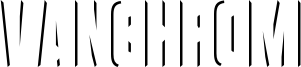
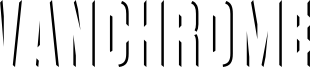
Vanchrome is a compact sans-serif headliner with chromatic layers. Create a layer in your design application, copy the layer, change the style, change the colors. Some applications such as Photoshop might need manual vertical alignment so cross-hair in the ◊ character position has been included. Due to the way Vanchromes bevel shading is designed, the Left and Right bevels should be placed under the Up and Down bevels. For a classic chrome effect, try the following order: Back, Front, Horizon, Ground, Sky, Left, Right, Up, Down, Grid (optional), Edge, Sparkle. Manually offset the back style to make a drop shadow. The Clear layer is designed to be used on its own or layered between Back and Sparkle layers. Greek and Cyrillic alphabets are included.

If you'd like separate color layers, you can get them at Typodermic Fonts.

The desktop license for Vanchrome Clear is free. If you'd like to embed this font in an app, ebook, on the web or anything that's not covered by the desktop license agreement, visit the link below. You'll find distributors who offer different types of licenses or you can contact me for help.

Please read the FAQ on the front page of Typodermic Fonts and don't be afraid to ask questions if you're not sure.

http://typodermicfonts.com/vanchrome

标签

字符映射表

使用下拉菜单查看此字体包含的不同字符映射表。
基本拉丁字母 - 字符映射表

字体基本信息

版权注意
Released in 2024 under CC0 license. No rights reserved.
字体系
Vanchrome Clear
字体次系
Regular
独立次系身份
Version 1.001;TYPO;VanchromeClear-Regular;2024;FL830
全字体名称
VanchromeClear-Regular
名字目录版
Version 1.001
页面描述语言字体名称
VanchromeClear-Regular
制造商名字
Ray Larabie
设计师
描述
Introducing Vanchromethe chromed up typeface with a compact sans-serif design and chromatic layer system, youll be able to create designs that truly stand out.

Lets start with the layer system. Vanchromes layer system is designed for maximum flexibility. All you have to do is create a layer in your design application, copy the layer, change the style, and change the colors. Its that easy! And if youre using Photoshop, weve even included a crosshair in the Ê character position to ensure perfect vertical alignment.

Now, lets talk about Vanchromes layering. The left and right bevels should be placed under the up and down bevels to achieve the classic chrome effect. For that classic look, try the following layer order: Back, Front, Horizon, Ground, Sky, Left, Right, Up, Down, Grid (optional), Edge, and Sparkle. And why not duplicate and manually offset the back style to create a drop shadow effect?

So why settle for ordinary when you can create designs that are truly unique with Vanchrome? Whether youre designing logos, posters, or anything in between, Vanchromes chromatic layers and airbrushed chrome effect will take your designs to the next level. Try it out today and see the difference for yourself!

字体扩展信息

支持的平台

平台编码
统一字符编码2.0及以上字符编码型,只有BMP统一字符编码
苹果电脑罗马
微软只有BMP统一字符编码

字体详情

创建日期2024-04-04
版本1
字形数量267
每em单位数1000
嵌入权限永久安装的嵌入
字体家族分类无归类
字重
字宽压缩
Mac样式粗体
方向只限从左到右的字符+包含中立
图案属性
字符间距无间隔
完整字体包包含以下14种字重:
Vanchrome Clear.otf
Vanchrome Grid.otf
Vanchrome Front.otf
vanchrome back.otf
Vanchrome Sparkle.otf
Vanchrome Left.otf
Vanchrome Up.otf
Vanchrome Right.otf
Vanchrome Edge.otf
Vanchrome Horizon.otf
Vanchrome Down.otf
Vanchrome Sky.otf
Vanchrome Ground.otf
Vanchrome Outline.otf